BurnSim 3/BurnSim Fields: Difference between revisions

From BurnSim Wiki
Jump to navigation Jump to search
m Gregd moved page BurnSim Fields to BurnSim 3/BurnSim Fields without leaving a redirect: Archiving BurnSim 3 documentation ahead of BurnSim 4 content rewrite
No edit summary
 
Line 1: Line 1:
'''This page documents BurnSim 3.''' See [[Main Page]] for current BurnSim 4 documentation. This page is kept for reference by users still running BurnSim 3.
Hover over or click on various fields in the image below to get more details on each field in BurnSim.  


Line 31: Line 33:
rect 461 187 603 214 [[ThrustCoefficient|Thrust Coefficient - Specify this if you wish to use a given thrust coefficient instead of it being calculated from nozzle dimensions.]]
</imagemap>
</imagemap>
[[Category:BurnSim 3 (Legacy)]]

Latest revision as of 10:04, 10 August 2026

This page documents BurnSim 3. See Main Page for current BurnSim 4 documentation. This page is kept for reference by users still running BurnSim 3.

Hover over or click on various fields in the image below to get more details on each field in BurnSim.
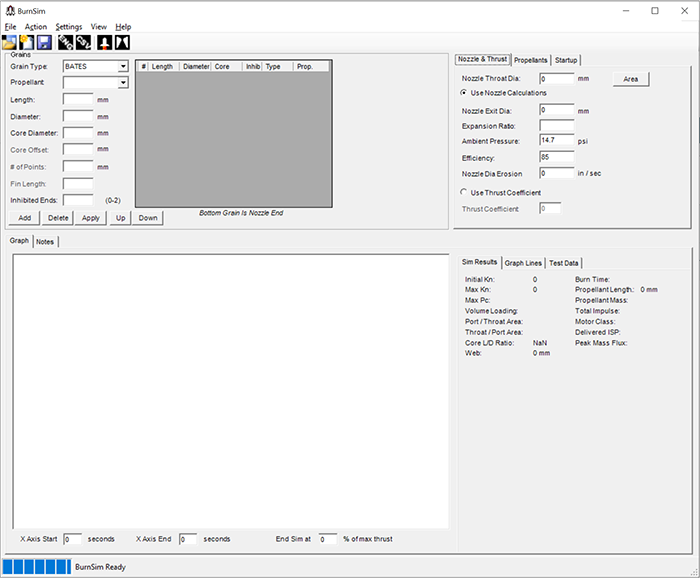
BurnSim Main WindowGrain TypesSelect the Propellant to be used in the selected grain(s)GrainLengthGrain DiameterCore DiameterCore Offset - this field will change depending on the type of grain selectedNumber Of Points when a star grain is selected - this field will change depending on the type of grain selected Number Of Points when a star grain is selected - this field will change depending on the type of grain selectedFin Length for finocyl grains - this field will change depending on the type of grain selectedInhibited Ends - select the number of inhibited ends for the grain(s).  Can be 0-2.Add Grain - this button adds a grain with the specified propertiesDelete Grain - this button will delete any grains selected in the gridUpdate Grain - this button will update any grains selected in the grid with the properties specified.Grain Up - moves the grain up in the motorGrain Down - moves the grain down in the motorGrain Grid - displays motor grainsNozzle Tab - click here to enter nozzle propertiesPropellants Tab - Click here to view  edit and add propellantsStartup Tab - options for startup transients.   Not currently implementedNozzle Throat DiameterUse Nozzle Calculations - when selected this will calculate thrust coefficient based on nozzle dimensionsNozzle Exit DiameterExpansion RatioAmbient Pressure Ambient PressureEfficiency - Thrust/nozzle caclulations are based on ideal conditions  which are not normally encountered in real life.  Select a value here like 90% as needed.Nozzle Erosion - Erosion of the nozzle over timeThrust Coefficient - Specify this if you wish to use a given thrust coefficient instead of it being calculated from nozzle dimensions.