Main Page
BurnSim is software for simulating solid rocket motors (often called rocket engines), built to be as simple to use as possible while staying accurate for real motor designs. It's free to download, with a five-day trial of the full program, and a low-cost personal license ($49) for continued use - free for .edu (student/education) users; see the download page for details. The personal and educational licenses are for non-commercial use; business and professional use needs a commercial license ($149), which can be bought directly at www.burnsim.com/purchase.aspx. See the License page for the full terms. This wiki documents BurnSim 4, the current cross-platform (Windows, Mac, Linux) rewrite of BurnSim, and covers general topics related to experimental solid propellant motors: propellant characterization, motor testing, data acquisition, and more.
Still running BurnSim 3? It was retired in September 2026 and is no longer available for download, though existing installs and licenses keep working - see the FAQ for what that means and how to move to BurnSim 4. Its interface differs substantially from what's shown below; the old documentation is archived under BurnSim 3 (Legacy).
Visit burnsim.com for downloads, news, and release history. For questions about BurnSim itself, see contact us.
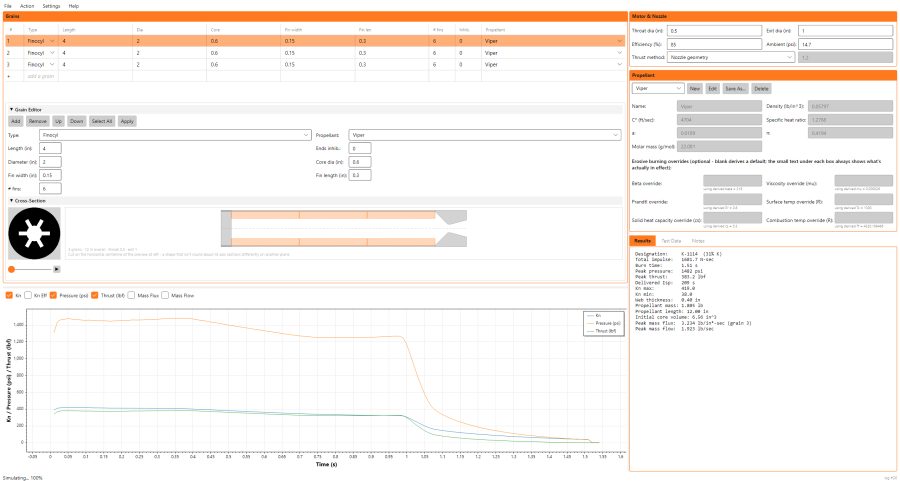
The Main Window
Hover over or click on parts of the window below for more detail on each area.
Getting Started
New to BurnSim? Start with Getting Started with a Basic Simulation.
Topics
- BurnSim Fields - full field-by-field reference for the main window
- Grain Types - the available grain geometries
- Custom Grain Import - drawing or importing a grain cross-section of your own
- Revolved Profile Grain - a grain drawn as a half-section and revolved about the axis (commercial license only)
- BurnSim vs openMotor - how the two compare, and opening your openMotor (.ric) designs in BurnSim
- Propellant Characterization - getting the numbers BurnSim needs for a propellant
- Propellant Thermochemistry - computing those numbers directly from an ingredient recipe, built into BurnSim 4
- Accuracy and Validation - what BurnSim's results are checked against, and which numbers it cannot check for you
- Case Strength Check - the Case tab: hand calculations for the case tube, snap rings, threads and radial bolts, with every formula
- Erosive Burning - simulating crossflow-augmented burn rate
- Port-to-Throat Ratio - the quick check for whether a core is tight enough to burn erosively
- Characterization Motor - a simple test motor for gathering burn-rate data
- Data Acquisition - instrumenting a motor test
- Results Tab - every line the Results tab prints, and how to read it
- Results, Test Data and Notes - the tabs in the bottom-right panel
- Undo, Redo and Snapshots - stepping back through changes, and keeping named versions of a motor in its file
- Test Data Tab and Import from CSV - bringing real test data into BurnSim
- Activating BurnSim - activating a license, online or offline, and what each message means
- Installing on macOS - which build to pick, and what to do if a Mac will not open it
- Batch Mode - running a motor file from the command line, with no window